
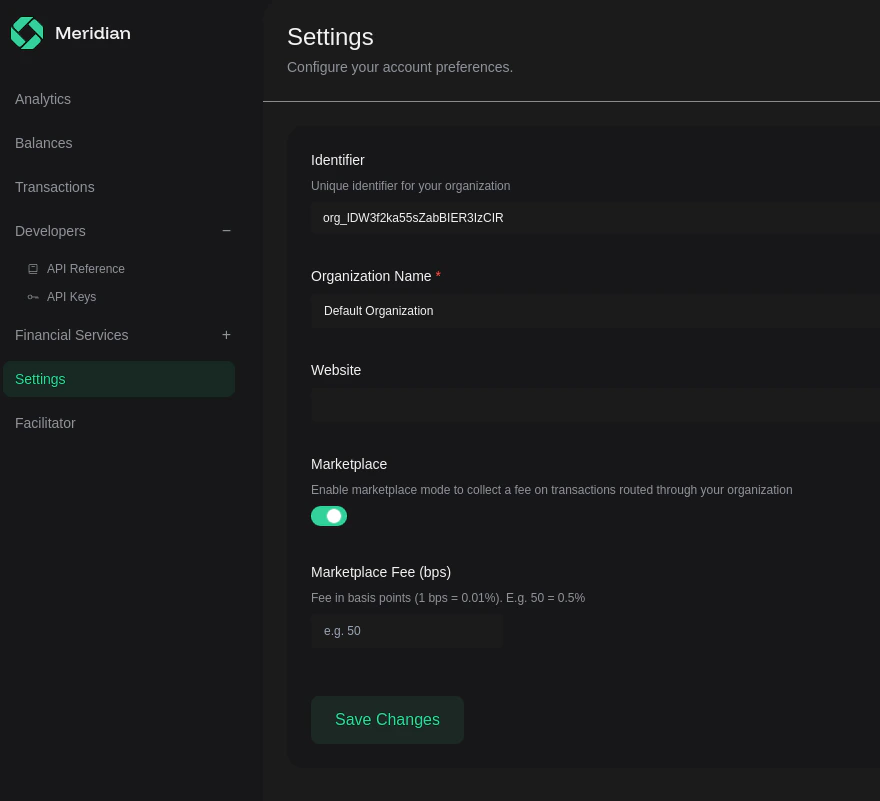
Enable marketplace mode
1
Open Settings
Sign in to Meridian Command Centre and open Settings under Financial
Services.
2
Turn on Marketplace
Toggle Marketplace on.
3
Set your fee
Enter your fee in basis points. Example:
500 bps = 5%.4
Save changes
Click Save Changes to apply the setting to your organization.
Older internal messages may call this “Platform” mode. In Command Centre the
setting is labeled Marketplace.
Update your x402 payment requirements
KeeppayTo pointed at the Meridian facilitator address for the target network.
Use extra.creditedRecipient to tell Meridian which wallet should receive the
net payout.
Below is a paymentRequirements example for the recommended Permit2-based
flow on a chain without native EIP-3009 support. The example uses MegaETH; use
the same pattern on BSC and BOT chain with that network’s token and chain id.
On chains without EIP-3009 support, use the ERC-20 token address in
asset,
approve Permit2 0x000000000022D473030F116dDEE9F6B43aC78BA3, and sign with
x402ExactPermit2Proxy 0x402085c248EeA27D92E8b30b2C58ed07f9E20001. See
Payment Types.How payouts work
payToremains the Meridian facilitator, not the seller wallet.- On Permit2 networks such as MegaETH, BSC, and BOT chain,
assetshould be the ERC-20 token address for the current Permit2 flow. - On Permit2 networks,
extra.nameandextra.versionshould describe the token used in the Permit2 flow. extra.creditedRecipientreceives the payment amount remaining after fees.- Your marketplace fee accrues inside the facilitator contract as a platform balance for your organization.
- Fees do not automatically land in your wallet. Withdraw them from the Settings page using Withdraw Marketplace Fees, or withdraw them directly on-chain from the proxy contract.
500 bps, Meridian records 5% of each payment as
marketplace fees. In the simple case where no other fee applies, the remaining
95% is settled to creditedRecipient.
Withdraw marketplace fees on-chain
You can also withdraw accumulated marketplace fees directly from the Meridian proxy contract by calling:msg.sender, so it is not passed as a
function argument.